Markerless MoCap: Instant Holo-Avatars from Two Smartphones
Solo creators can now capture full-body motion with two ordinary phones and a pose-estimation pipeline. We explain the setup, the clean-up and the limits.
Ravi Okafor
Games & XR Editor • • 4 min read
The quick take
- 1Two phones, one volumeCameras placed at angles let software estimate depth and build a 3D skeleton without suits or markers.
- 2Clean-up is the jobFoot sliding, jitter and occluded limbs mean you still need a pass of manual polish.
- 3Mind the people on cameraRecording anyone other than yourself calls for clear consent and sensible storage of footage.
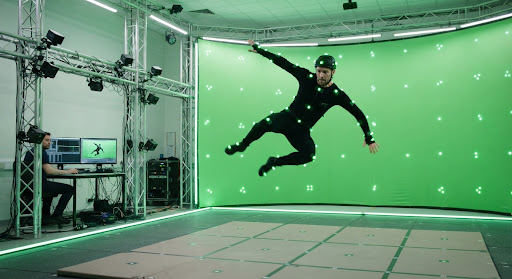
Motion capture used to mean a studio, a stage and a suit covered in reflective dots. A new generation of markerless tools is changing that picture. With two ordinary smartphones, a tripod or two and a pose-estimation pipeline, solo creators can record a full-body performance and drop it onto an avatar. We tried the workflow with PoseLoom, a fictional app in our launch edition, to see how it works, how much clean-up it demands and where it runs out of road.
How markerless capture works
Pose estimation software looks at each video frame and predicts where the major joints are: shoulders, elbows, wrists, hips, knees, ankles and so on. With a single camera, the depth of each joint is a guess. With two cameras viewing the same space from different angles, the software can triangulate, matching joints between views to work out where they sit in three dimensions. The output is a moving skeleton, which can then drive a character.
No sensors touch your body, which is the appeal. The trade-off is that the software must infer what it cannot see, and that is where most problems begin.
Setting up your two phones
Placement matters more than anything else you can control.
- Angle. Place the phones roughly ninety degrees apart, or a little less, so each sees the performer from a different side. Two cameras side by side give you little depth information.
- Height and distance. Mount them around chest height, pointing slightly down, far enough back to keep the performer's whole body in frame during the widest movement.
- Stability. Use tripods or solid supports. A bumped phone ruins a calibration.
- Orientation. Shoot in portrait for a standing performer, or landscape if they will roll or spread their arms.
Calibration and lighting
Calibration tells the software where the phones are relative to each other. In PoseLoom, you walk through the space holding a simple printed pattern, or just wave while the app watches from both views. Do it every time you move a phone, even by a little. Skipping it is the most common reason that limbs appear to float or twist.
Lighting is the second quiet hero. Even, bright light on the performer helps the software see edges. Avoid strong backlight, which turns a person into a silhouette, and avoid cluttered backgrounds with posters or mannequins that could be mistaken for people. Clothes that contrast with the background, and that fit closely enough to show the shape of the limbs, produce cleaner results than baggy layers.
Retargeting to an avatar
The raw skeleton belongs to the performer's proportions, which are probably not your avatar's. Retargeting maps the performance onto the character's own skeleton. If your character has long arms or a very different build, the software adjusts, but not always gracefully. Hands may pass through the torso, or feet may no longer reach the ground.
Start with a test action, such as a simple walk and a wave, before recording a long performance. If it looks wrong on the avatar, fix the mapping, not the take.
The clean-up pass
Expect to polish. Markerless capture is impressive, but rarely perfect straight out of the app. These are the issues we met most often, and the standard fixes.
- Foot sliding. Feet drift across the floor when they should be planted. Use foot-lock or contact detection tools, then adjust by hand where needed.
- Jitter. Tiny, fast tremors in the joints. A smoothing filter helps, but too much makes motion sluggish, so apply it lightly.
- Occlusion errors. When an arm passes behind the body, the estimate can flip or snap. Re-record that moment from a better angle, or key the limb by hand.
- Hands and fingers. Fine finger movement is usually too small for this setup. Animate it separately or use simple poses.
The limits
Know what this setup is not. It is not the right tool for fast, acrobatic movement, where limbs blur and overlap. It is not ideal for scenes with several performers close together, because the software may confuse who is who. And it will not replace a professional stage when a production demands very precise results. For streaming avatars, previsualization, indie games, social content and prototypes, however, it is genuinely useful, and it lowers the cost of trying an idea.
Privacy and consent
A capture session produces video, and video is personal data. If you are recording only yourself, store it with the same care as any other private footage. If you are recording a friend, an actor or a family member, tell them what will be captured, how it will be used and how long you will keep it, and get their agreement. Avoid filming bystanders, and be careful about what appears in the background of your room.
Consider deleting raw video once the motion data is extracted, since the skeleton alone is usually enough to animate. If you share a motion file, remember that a person's way of moving can be recognizable, so treat it with respect. Please note that PoseLoom and the scenarios described are fictional and illustrative.
Launch edition note: this is an illustrative story. The studios, platforms, people and events are fictional. See our disclosure protocol.
Ravi Okafor
Games & XR Editor at NewsEntertAI. Launch-edition byline. Spotted an error? Tell us.